Subrite API: Third-Party Integration Guide
Overview
The purpose of this document is to help third-party applications integrate with Subrite API and utilize the correct API calls to meet business needs. This guide provides examples of key business operations that can be performed using Subrite API.
Scope of Integration
Third-party applications integrating with Subrite API should aim to maintain existing functionalities while ensuring smooth operations. The tasks to be performed are defined based on business requirements and may include:
- Fetching Member Information
- Checking if an Email Exists Before Creation
- Updating an Existing Member with a New Membership
- Creating a New Member with a New Membership
- Updating Custom Properties
This guide is designed to assist any third-party service provider in integrating with Subrite API efficiently, ensuring seamless user experience and data consistency.
Prerequisites
Before integrating with the Subrite API, ensure you meet the following requirements:
1️⃣ Obtain M2M Access Token
Subrite API requires an M2M (Machine-to-Machine) access token for authentication. You can generate the token from the respective environment:
Stage Environment
- Frontend: *.subrite.no (Contact Subrite to get access)
- API: stage.api.subrite.no
Production Environment
- Frontend: minside.*.no (Contact Subrite to get access)
- API: api.subrite.no
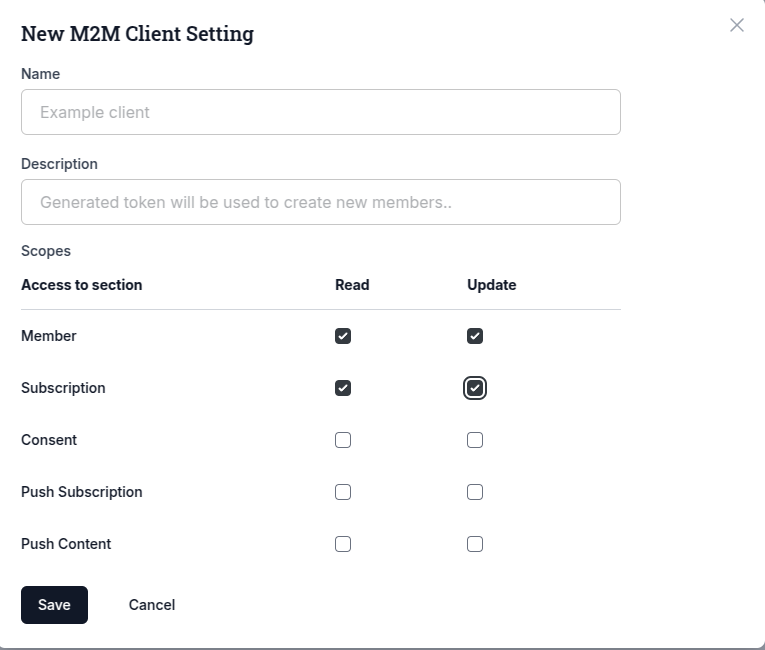
Process to create a M2M token:
Create a M2M token granting Member, Subscription and content permissions. You will receive the token once you click save.
API Details Specification
This section provides details on various API operations available for third-party integration.
🔍 Filter Members
To find an existing member using email or custom properties, you can use the following API call:
📌 API Call
POST /api/v1/members/filter
📌 Headers
Authorization: Bearer {m2m_token}
Content-Type: application/json
📌 Body
{
  "filters": [
    {
      "field": "updatedAt",
      "operator": "gte",
      "value": "2024-01-08T07:02:23.742Z"
    },
    {
      "field": "email",
      "operator": "eq",
      "value": "[email protected]"
    },
    {
      "field": "customProperty.propertyKey",
      "operator": "eq",
      "value": 1144
    },
    {
      "field": "subscriptionPlanId",
      "operator": "eq",
      "value": 17
    },
    {
      "field": "subscriptionStatus",
      "operator": "eq",
      "value": "active"
    }
  ]
}
The request body key is filters, and the subscription-status field is subscriptionStatus. Earlier
revisions of this page showed filter and subscriptionPlanStatus; neither name is accepted.
This endpoint applies exactly these fields: updatedAt, id, email, customProperty.<name>,
subscriptionStatus and subscriptionPlanId. Anything else is rejected rather than ignored —
an unrecognized name returns errors: [{ field: "field", messageCode: "invalidFormat" }], and a
recognized name outside the list above returns messageCode: "memberFilterFieldUnsupported".
A custom-property filter must carry the property name in the field, as
customProperty.propertyKey. The bare customProperty field is rejected here: without the name
there is nothing to compare, and it previously returned an empty page rather than an error.
The two member-filter endpoints accept overlapping but different field sets — neither is a superset
of the other. For member attributes this endpoint does not list (name, phone, postCode,
consent, inactivity, emailStatus, search, type, isCompany), use
POST /api/v1/members/list; for subscriptionStatus, subscriptionPlanId and the dotted
custom-property form, use this one.
If you are upgrading: as with the list endpoint, the only calls that change are ones already
returning the wrong rows — an ignored filter meant you got the whole tenant back with a 200, and a
bare customProperty filter meant you got nothing back. Check your payloads against the six fields
above; if they all appear there, nothing changes. No data migration, nothing to roll back.
📌 Response
{
  "items": [
    {
      "id": "string", // Updated: memberId is now a string,Ex: "1", "c29a724f-36cf-4584-9d47-1cdde8733f75" etc
      "fullName": "string",
      "nickName": "string",
      "email": "string",
      "birthDate": "2024-01-08T07:02:23.742Z",
      "phone": "+4793155388", // Updated: Remove countryCode Return Phone along with calling code
      "isCompany": true,
      "companyName": "string",
      "organizationNo": "string",
      "memberNumber": 1234, // memberNumber is a number
      "customPropertyValues": {
        "propertyKey": "propertyValue"
      }
    }
  ]
}
More details on this API can be found here: Get all members of the tenant with filter & pagination.
🔍 List Members
To list members of the tenant with minimal data and pagination using an M2M Token with MEMBER READ permission, you can use the following API call:
📌 API Call
POST /api/v1/members/list?page=1&take=20
📌 Headers
Authorization: Bearer {m2m_token}
Content-Type: application/json
📌 Body
The body is optional and can be used to filter the list.
{
  "filters": []
}
Every filter you send must be one this list can apply. All three rejections below are 400, but they
carry different codes, so branch on the code rather than the status:
| What you sent | Response |
|---|---|
A field that is not a recognized filter name at all (e.g. subscriptionPlanStatus) | errors: [{ field: "field", messageCode: "invalidFormat" }] |
A recognized field this endpoint cannot serve — subscriptionStatus, subscriptionPlanId, or the dotted customProperty.<name> form (use POST /api/v1/members/filter for those; note this endpoint takes the bare customProperty field with the name in value) | messageCode: "memberFilterFieldUnsupported" |
A recognized field whose value shape the list cannot compare (e.g. a consent filter missing status) | messageCode: "memberFilterValueInvalid" |
Previously all three were ignored, which meant a request that asked for a narrow slice could come
back with every member in the tenant and a matching total count. Send an empty filters array (or no
body) when you want the whole list.
If you are upgrading: the only calls that change behaviour are ones that were already returning
the wrong rows. A request whose filters were all being ignored used to return 200 with the entire
tenant; it now returns 400. Audit your filter payloads against the field list above — if every
field you send is in it, nothing changes for you. There is no data migration and nothing to roll
back on your side; if a 400 blocks you, drop the unsupported filter and narrow the result set in
your own code until you can move the query to POST /api/v1/members/filter.
📌 Response
{
  "items": [
    {
      "memberId": "1",
      "memberNumber": 1234,
      "fullName": "string",
      "isCompany": false,
      "companyName": "string",
      "email": "string",
      "phone": "+4793155388",
      "createdAt": "2024-01-08T07:02:23.742Z",
      "memberEmailStatus": "delivered",
      "totalRevenue": 0,
      "hasActiveSubscription": true
    }
  ],
  "meta": {
    "totalItems": 1,
    "itemCount": 1,
    "itemsPerPage": 20,
    "totalPages": 1,
    "currentPage": 1
  }
}
More details on this API can be found here: Get all members of the tenant with minimal data with pagination.
🔍 List Member Subscriptions
To list the subscriptions of the tenant with pagination using an M2M Token with SUBSCRIPTION READ permission, you can use the following API call:
📌 API Call
POST /api/v1/members/subscriptions/list?page=1&take=20
📌 Headers
Authorization: Bearer {m2m_token}
Content-Type: application/json
📌 Body
The body is optional and can be used to filter the list.
{
  "filters": []
}
📌 Response
{
  "items": [
    {
      "id": 1,
      "payer": "string",
      "memberNumber": 1234,
      "subscriptionPlan": "string",
      "lastPaidAmount": 0,
      "recurringPrice": 0,
      "autoRenew": true,
      "hasCustomPrice": false,
      "activeSubscriptionDays": 0,
      "nextRenewal": "2024-01-08T07:02:23.742Z",
      "paymentProvider": "stripe",
      "status": "active",
      "scheduledActivationDate": null
    }
  ],
  "meta": {
    "totalItems": 1,
    "itemCount": 1,
    "itemsPerPage": 20,
    "totalPages": 1,
    "currentPage": 1
  }
}
More details on this API can be found here: Get all subscriptions of the tenant with pagination.
🔍 Create or Update a Member
When integrating with Subrite API, you must first check if a member exists before deciding whether to create a new member or update an existing one.
⚠️ Important Notes:
- If you attempt to create a member with an existing
email,customPropertyKey1, orcustomPropertyKey2, the API will reject the request. - To avoid conflicts, always check if the member exists first before making a create request.
🔍 Step 1: Check if the Member Exists
Use the Filter Members API (as described in the previous section) to check if a member exists.
- If the member exists, the response will include a
memberId. - Use this
memberIdto update the member instead of creating a new one.
More details on creating and updating members will be covered in the following sections.
🆕 Create a Member
To create a new member in Subrite, use the following API request.
📌 API Call
POST /api/v1/members
📌 Headers
Authorization: Bearer {m2m_token}
Content-Type: application/json
📌 Body
{
  "fullName": "string",
  "email": "string",
  "phone": "+4712345678", // Updated: Remove countryCode, Send calling code along with phone
  "birthDate": "2024-01-08T11:26:36.376Z",
  "nickName": "string",
  "isCompany": true,
  "companyName": "string",
  "address": {
    "line1": "string",
    "line2": "string",
    "city": "string",
    "state": "string",
    "postCode": "string",
    "country": "string",
    "addressType": "primary"
  },
  "customPropertyValues": {}
}
📌 Response
{
  "id": "string", // Updated: memberId is now a string,Ex: "1", "c29a724f-36cf-4584-9d47-1cdde8733f75" etc
  "fullName": "string",
  "email": "string",
  "phone": "+4793155388", // Updated: Remove countryCode Return Phone along with calling code
  "birthDate": "2024-01-08T11:26:36.376Z",
  "nickName": "string",
  "isCompany": true,
  "companyName": "string",
  "memberNumber": 1234, // memberNumber is a number
  "address": {
    "line1": "string",
    "line2": "string",
    "city": "string",
    "state": "string",
    "postCode": "string",
    "country": "string",
    "addressType": "primary"
  },
  "customPropertyValues": {
    "propertyKey": "propertyValue"
  }
}
More details on this API can be found here: Create a new member.
🔄 Update a Member
To update an existing member, use the following API request.
📌 API Call
PUT /api/v1/members/{memberId}
📌 Headers
Authorization: Bearer {m2m_token}
Content-Type: application/json
📌 Body
{
  "fullName": "string",
  "email": "string",
  "phone": "+4712345678", // Updated: Remove countryCode, Send calling code along with phone
  "birthDate": "2024-01-08T11:26:36.376Z",
  "nickName": "string",
  "isCompany": true,
  "companyName": "string",
  "address": {
    "line1": "string",
    "line2": "string",
    "city": "string",
    "state": "string",
    "postCode": "string",
    "country": "string",
    "addressType": "primary"
  },
  "customPropertyValues": {
    "propertyKey": "propertyValue"
  }
}
📌 Response
{
  "id": "string", // Updated: memberId is now a string,Ex: "1", "c29a724f-36cf-4584-9d47-1cdde8733f75" etc
  "fullName": "string",
  "email": "string",
  "phone": "+4793155388", // Updated: Remove countryCode Return Phone along with calling code
  "birthDate": "2024-01-08T11:26:36.376Z",
  "nickName": "string",
  "isCompany": true,
  "companyName": "string",
  "organizationNo": "string",
  "memberNumber": 1234, // memberNumber is a number
  "address": {
    "line1": "string",
    "line2": "string",
    "city": "string",
    "state": "string",
    "postCode": "string",
    "country": "string",
    "addressType": "primary"
  },
  "customPropertyValues": {
    "propertyKey": "propertyValue"
  }
}
More details on this API can be found here: Update a member.
🔄 Update a Member's Custom Properties
To update a member's custom properties, use the following API request.
📌 API Call
PATCH /api/v1/members/{memberId}
📌 Headers
Authorization: Bearer {m2m_token}
Content-Type: application/json
📌 Body
{
  "customPropertyValues": {
    "propertyKey": "propertyValue"
  }
}
More details on this API can be found here: Update a member.
📦 Create a Subscription
To subscribe a member to a product package, use the following API request.
📌 API Call
POST /api/v1/product-packages/subscribe
📌 Headers
Authorization: Bearer {m2m_token}
Content-Type: application/json
📌 Body
{
  "packageId": 17,
  "optionalProducts": [
    {
      "productId": 201,
      "quantity": 2,
      "shippingCountry": "NO"
    },
    {
      "productId": 202,
      "quantity": 1
    }
  ],
  "paymentDate": "2024-01-08T07:43:30.122Z",
  "memberId": "1",
  "reference": ""
}
📌 Field Descriptions
- packageId (number, required) → The ID of the product package.
- optionalProducts (array, optional) → List of optional products with quantity and optional shipping country.
- productId (number, required) → The ID of the product.
- quantity (number, required, min:1) → Number of units for this product.
- shippingCountry (string, optional) → Country code if product requires shipping.
- paymentDate (ISO8601 date string, optional) → The date of payment (e.g.,
"2024-01-08T07:43:30.122Z"). - memberId (string, required) → The ID of the member. Example:
"1","c29a724f-36cf-4584-9d47-1cdde8733f75". - reference (string, optional) → A custom reference string for the subscription.
⚠️ Note and Caution
Note: When using this API, Subrite will treat the payment as already collected. The payment method will be updated to E-invoice, and the nextOrderDate will be set so that the next renewal payment will be processed via E-invoice.
Caution: Ensure that the E-invoice payment method is enabled for the tenant before using this API.
More details on this API can be found here: Create a subscription for pre-purchased package.
🔍 Get Packages by Filters
To find packages using filters with M2M Token having permissions PLANS_AND_PRODUCTS READ, you can use the following API call:
📌 API Call
GET /api/v1/product-packages/all
📌 Headers
Authorization: Bearer {m2m_token}
Content-Type: application/json
📌 Query Parameters (Filters)
All filters are optional. You can combine multiple filters to narrow down the results.
- status (string or array, optional) → Filter packages by status. Accepts single or multiple values. Available values:
draft,published,unpublished. When not provided, returns packages with all statuses. - isAvailableViaSlug (boolean, optional) → Filter packages that are available via slug. When
true, returns only packages that can be accessed through a slug URL. - isAvailableOnMyPage (boolean, optional) → Filter packages that are available on the member's "My Page". When
true, returns only packages that members can see and manage from their personal page. - isAvailableForManualOrderViaAdmin (boolean, optional) → Filter packages that are available for manual order by admin. When
true, returns only packages that administrators can manually order on behalf of members. - enableGiftSubscription (boolean, optional) → Filter packages that have gift subscription enabled. When
true, returns only packages where the associated subscription plan has gift subscription functionality enabled.
📌 Example Requests
# Filter by single status
GET /api/v1/product-packages/all?status=published

# Filter by multiple statuses
GET /api/v1/product-packages/all?status=published&status=draft

# Combine with other filters
GET /api/v1/product-packages/all?status=published&isAvailableViaSlug=true&isAvailableOnMyPage=true
📌 Response
[
  {
    "id": 17,
    "salesTitle": "Premium Package",
    "name": "Premium Package",
    "slug": "premium-package",
    "image": "https://example.com/image.jpg",
    "description": ["Package description"],
    "price": 299.0,
    "recurringPrice": 299.0,
    "status": "publish",
    "isAvailableViaSlug": true,
    "isAvailableOnMyPage": true,
    "isAvailableForManualOrderViaAdmin": false,
    "products": [
      {
        "productId": 201,
        "name": "Product Name",
        "price": 299.0,
        "recurringPrice": 299.0,
        "currency": "NOK",
        "tax": 25,
        "isOptional": false,
        "productCategory": "digital_subscription"
      }
    ],
    "subscriptionCount": 150
  }
]
More details on this API can be found here: Get packages by filters.
🔍 Get Package Details by ID
To get a specific package details by ID using M2M Token having permissions PLANS_AND_PRODUCTS READ, you can use the following API call:
📌 API Call
GET /api/v1/product-packages/details/:id
📌 Headers
Authorization: Bearer {m2m_token}
Content-Type: application/json
📌 Path Parameters
- id (number, required) → The ID of the package.
📌 Example Request
GET /api/v1/product-packages/details/17
📌 Response
{
  "id": 17,
  "salesTitle": "Premium Package",
  "name": "Premium Package",
  "slug": "premium-package",
  "image": "https://example.com/image.jpg",
  "description": ["Package description"],
  "price": 299.0,
  "recurringPrice": 299.0,
  "status": "publish",
  "isAvailableViaSlug": true,
  "isAvailableOnMyPage": true,
  "isAvailableForManualOrderViaAdmin": false,
  "billingPeriod": "monthly",
  "products": [
    {
      "productId": 201,
      "name": "Product Name",
      "price": 299.0,
      "recurringPrice": 299.0,
      "basePrice": 299.0,
      "currency": "NOK",
      "tax": 25,
      "isOptional": false,
      "productCategory": "digital_subscription",
      "properties": null,
      "recurringProperties": null,
      "description": "Product description",
      "shippingCharges": []
    }
  ],
  "subscriptionCount": 150,
  "paymentProviders": ["stripe", "vipps"],
  "customInputFields": {
    "memberType": true,
    "invoiceAddress": true,
    "city": true
  }
}
More details on this API can be found here: Get a package details by ID.
🔍 Get all the available podcasts
To find all the available configured podcasts using M2M Token having permissions CONTENT READ, you can use the following API call:
📌 API Call
GET /api/v1/podcast-admin
📌 Headers
Authorization: Bearer {m2m_token}
Content-Type: application/json
📌 Response
[
  {
    "id": 1,
    "createdAt": "2024-12-03T04:03:05.156Z",
    "updatedAt": "2025-10-22T04:57:01.219Z",
    "deletedAt": null,
    "metaData": null,
    "name": "Test Name",
    "rssFeedUrl": "",
    "imageUrl": "",
    "showUrl": "",
    "description": "Test description",
    "sortOrder": 0,
    "tenantId": 0
  }
]
More details on this API can be found here: Get all podcasts of the tenant.
🔍 Get a podcast details
To get a specific podcast details by ID using M2M Token having permissions CONTENT READ, you can use the following API call:
📌 API Call
GET /api/v1/podcast-admin/:id
📌 Headers
Authorization: Bearer {m2m_token}
Content-Type: application/json
📌 Response
{
  "id": 1,
  "createdAt": "2024-12-03T04:03:05.156Z",
  "updatedAt": "2025-10-22T04:57:01.219Z",
  "deletedAt": null,
  "metaData": null,
  "name": "Test Name",
  "rssFeedUrl": "",
  "imageUrl": "",
  "showUrl": "",
  "description": "Test description",
  "sortOrder": 0,
  "tenantId": 0
}
More details on this API can be found here: Get a podcast details by ID of the tenant.
🔍 List Asset Folders
To list the tenant's asset folders together with per-folder file counts and tenant-wide usage totals, using an M2M Token having permissions CONTENT READ, you can use the following API call. Assets are files (images, PDFs, documents, etc.) uploaded to the tenant's media library and served publicly from the tenant's dedicated CDN domain.
📌 API Call
GET /api/v1/asset-admin/folders
📌 Headers
Authorization: Bearer {m2m_token}
Content-Type: application/json
📌 Response
{
  "folders": [
    {
      "id": 1,
      "name": "Brand",
      "slug": "brand",
      "fileCount": 6,
      "createdAt": "2026-02-02T09:15:00.000Z"
    }
  ],
  "totalFileCount": 24,
  "totalSizeBytes": 18452312,
  "cdnDomain": "assets.subrite.no"
}
- folders → the tenant's folders.
slugis the first path segment of every file's public URL in that folder. - totalFileCount / totalSizeBytes → totals across the whole tenant, including root-level files (files not in any folder).
- cdnDomain → the domain files are served from; the public URL of a file is
https://{cdnDomain}/{tenantId}/{folderSlug}/{fileName}(root-level files omit the{folderSlug}segment).
More details on this API can be found here: List folders with counts and usage totals.
🔍 List Assets
To list, search and sort the tenant's assets with pagination, using an M2M Token having permissions CONTENT READ, you can use the following API call. Search and sort span the whole tenant set.
📌 API Call
GET /api/v1/asset-admin/assets?page=1&take=24
📌 Headers
Authorization: Bearer {m2m_token}
Content-Type: application/json
📌 Query Parameters
All parameters are optional.
- page (number, default: 1) → Page number.
- take (number, 1–50, default: 24) → Page size.
- folderId (number, optional) → Restrict to one folder. Omit for "all files"; pass
0orrootfor root-level files (files not in any folder). - kinds (string, optional) → Restrict to certain file kinds, e.g.
kinds=image,svg(or a repeatedkindsparam). Any ofimage,svg,pdf,video,audio,font,doc. - search (string, optional) → Case-insensitive match on the display name.
- sort (string, optional) → One of
name,size,uploaded(default:uploaded). - order (string, optional) →
ascordesc(default:desc).
📌 Response
{
  "items": [
    {
      "id": 42,
      "folderId": 1,
      "title": "logo-subrite-primary.svg",
      "name": "logo-subrite-primary.svg",
      "url": "https://assets.subrite.no/17/brand/logo-subrite-primary.svg",
      "kind": "svg",
      "mimeType": "image/svg+xml",
      "sizeBytes": 8192,
      "width": 512,
      "height": 512,
      "altText": null,
      "createdAt": "2026-02-02T09:15:00.000Z"
    }
  ],
  "meta": {
    "totalItems": 24,
    "itemCount": 24,
    "itemsPerPage": 24,
    "totalPages": 1,
    "currentPage": 1
  }
}
- folderId →
nullfor root-level files. - title → the human display name; name → the URL-safe file name (the last segment of
url). - url → the public CDN URL to link/embed directly.
- kind → one of
image,svg,pdf,video,audio,font,doc. - width / height → present for images/SVGs, otherwise
null.
More details on this API can be found here: List/search/sort assets.
🔍 Get an Asset
To fetch a single asset by ID, using an M2M Token having permissions CONTENT READ, you can use the following API call:
📌 API Call
GET /api/v1/asset-admin/assets/:id
📌 Headers
Authorization: Bearer {m2m_token}
Content-Type: application/json
📌 Path Parameters
- id (number, required) → The ID of the asset.
📌 Response
{
  "id": 42,
  "folderId": 1,
  "title": "logo-subrite-primary.svg",
  "name": "logo-subrite-primary.svg",
  "url": "https://assets.subrite.no/17/brand/logo-subrite-primary.svg",
  "kind": "svg",
  "mimeType": "image/svg+xml",
  "sizeBytes": 8192,
  "width": 512,
  "height": 512,
  "altText": null,
  "createdAt": "2026-02-02T09:15:00.000Z"
}
More details on this API can be found here: Get a single asset.
🔍 Download an Asset
To download an asset's file bytes, using an M2M Token having permissions CONTENT READ, you can use the following API call. Unlike the public url (which the CDN serves inline), this endpoint streams the object with a Content-Disposition: attachment header, so browsers and HTTP clients save it as a file using its display name.
📌 API Call
GET /api/v1/asset-admin/assets/:id/download
📌 Headers
Authorization: Bearer {m2m_token}
📌 Path Parameters
- id (number, required) → The ID of the asset.
📌 Response
The raw file bytes, with:
- Content-Type → the asset's MIME type (e.g.
image/svg+xml,application/pdf). - Content-Disposition →
attachment; filename="..."using the asset's display name.
More details on this API can be found here: Download an asset.
📝 Summary of Key API Calls
| API Operation | API Endpoint |
|---|---|
| Fetch Member Info | POST /api/v1/members/filter |
| Check if Email Exists | POST /api/v1/members/filter |
| List Members | POST /api/v1/members/list |
| List Member Subscriptions | POST /api/v1/members/subscriptions/list |
| Update Existing Member | PATCH /api/v1/members/{memberId} |
| Create New Member | POST /api/v1/members |
| Create Subscription | POST /api/v1/product-packages/subscribe |
| Update Custom Properties | PATCH /api/v1/members/{memberId} |
| Fetch Packages by Filters | GET /api/v1/product-packages/all |
| Fetch Package Details | GET /api/v1/product-packages/details/{id} |
| Fetch All Podcasts List | GET /api/v1/podcast-admin |
| Fetch a Podcasts Details | GET /api/v1/podcast-admin/{id} |
| List Asset Folders | GET /api/v1/asset-admin/folders |
| List Assets | GET /api/v1/asset-admin/assets |
| Fetch an Asset | GET /api/v1/asset-admin/assets/{id} |
| Download an Asset | GET /api/v1/asset-admin/assets/{id}/download |
🔄 Changelog
📌 Filtered Members API
- API Call:
POST /api/v1/members/filter - Response Update:
"phone": "+4793155388" // Removed countryCode, returning phone along with calling code
📌 Create Member API
- API Call:
POST /api/v1/members - Response Update:
"phone": "+4793155388" // Removed countryCode, returning phone along with calling code
📌 Update Member API
-
API Call:
PATCH /api/v1/members/{memberId} -
Response Update:
"phone": "+4793155388" // Removed countryCode, returning phone along with calling code
📌 Update memberId type
-
API Call:
PATCH /api/v1/members/{memberId} -
Response Update:
"memberId": "1" // Updated: memberId is now a string,Ex: "1", "c29a724f-36cf-4584-9d47-1cdde8733f75" etc