TV Sign-In with the Device Flow
Typing an email address and a password with a TV remote is slow and error-prone. The device flow (RFC 8628) moves the typing to the member's phone:
- The TV asks Subrite for a code, then shows a QR code, a short URL and the code.
- The member points their phone camera at the QR code, or opens the URL and types the code.
- On the phone, the member signs in if they aren't already, sees your app's name and the code, and approves.
- The TV polls Subrite every few seconds while this happens. The first poll after the member approves returns the tokens.
The TV gets the same tokens as the web flow: same issuer,
same API audience, same sub. A token from the TV works everywhere a web token does.
Before You Start
Get the Device Flow Enabled for Your Client
The device flow is enabled per OIDC client. For now, ask your Subrite contact to enable it. We will enable it on stage first so you can test, and then on production.
A TV app is set up as a public client: it sends its client_id and no client_secret. Anyone
can extract a secret from an app installed on a TV, so a secret would prove nothing
(RFC 8628 §5.6). A public client that sends a
client_secret anyway is refused with invalid_client.
If your platform can only authenticate with a secret, tell us, and we will keep your client
confidential. Then send client_id and client_secret on every request on this page, the same
way as in the web flow.
Endpoints and Discovery
Every tenant has its own issuer on its own domain. The examples on this page use
https://example.com; replace it with your tenant's domain. Request the code, poll for tokens,
refresh and revoke on the same domain: a code from one tenant does not work on another.
Read the endpoints from the tenant's discovery document instead of hardcoding them:
GET https://example.com/.well-known/openid-configuration
{
  "issuer": "https://example.com/api/oidc",
  "device_authorization_endpoint": "https://example.com/api/oidc/device/auth",
  "token_endpoint": "https://example.com/api/oidc/token",
  "revocation_endpoint": "https://example.com/api/oidc/token/revocation"
}
The response is shortened here. device_authorization_endpoint and revocation_endpoint are only
present once the device flow is enabled for a client on the tenant. If they are missing, the device
flow isn't enabled yet.
1. Request a Code
Endpoint
POST /api/oidc/device/auth
Headers
Content-Type: application/x-www-form-urlencoded
Accept: application/json
Parameters
| Parameter | Required | Type | Description |
|---|---|---|---|
| client_id | Yes | string | Your Client ID. |
| scope | Yes | string | openid offline_access |
| device_name | No | string | A name for the device, for example Living room TV. At most 64 characters. |
| device_model | No | string | The device's model, for example Samsung QE55Q80. At most 64 characters. |
offline_accessWithout offline_access, the TV's tokens are tied to the member's browser session on the phone.
They stop working when that session ends, for example when the member signs out on the phone.
The member sees device_name and device_model on the approve screen, marked as reported by the
device. A value longer than 64 characters, or one containing control characters or invisible
characters, is refused with invalid_request. Don't send the device's IP address or location:
Subrite observes those itself. Any other parameter is ignored.
Example Request
curl --request POST 'https://example.com/api/oidc/device/auth' \
  --header 'Accept: application/json' \
  --data-urlencode 'client_id=your-client-id' \
  --data-urlencode 'scope=openid offline_access' \
  --data-urlencode 'device_name=Living room TV' \
  --data-urlencode 'device_model=Samsung QE55Q80'
Response
{
  "device_code": "Sx8mJ0p2lW7bqC3vK9tYc1fN6uR4hZ5aE2dG8iL0oPq",
  "user_code": "482 913",
  "verification_uri": "https://example.com/activate",
  "verification_uri_complete": "https://example.com/activate?user_code=482%20913",
  "expires_in": 900,
  "interval": 5
}
| Field | Description |
|---|---|
| device_code | The TV's secret for this sign-in. Send it when polling. Never show it, never put it in a URL and never log it. |
| user_code | The code the member enters on the phone: 6 digits, shown as 482 913. Show it exactly as you received it. |
| verification_uri | The short URL where the member types the code. |
| verification_uri_complete | The same URL with the code included. This is what the QR code contains. |
| expires_in | Seconds until the code expires: 15 minutes. After that, request a new code. |
| interval | Seconds to wait between polls of the token endpoint. |
Errors
error | Meaning | What to do |
|---|---|---|
invalid_client | The client_id is unknown, or a public client sent a client_secret. | Check the client ID, and send no secret. |
invalid_request | The device flow isn't enabled for your client, or a parameter is missing or invalid. error_description says which. | Ask us to enable the device flow, or fix the parameter. |
server_error | Something failed on our side. | Safe to retry: request a new code. |
If no client on the tenant has the device flow enabled, the endpoint does not exist and answers
404.
2. Show the Code on the TV
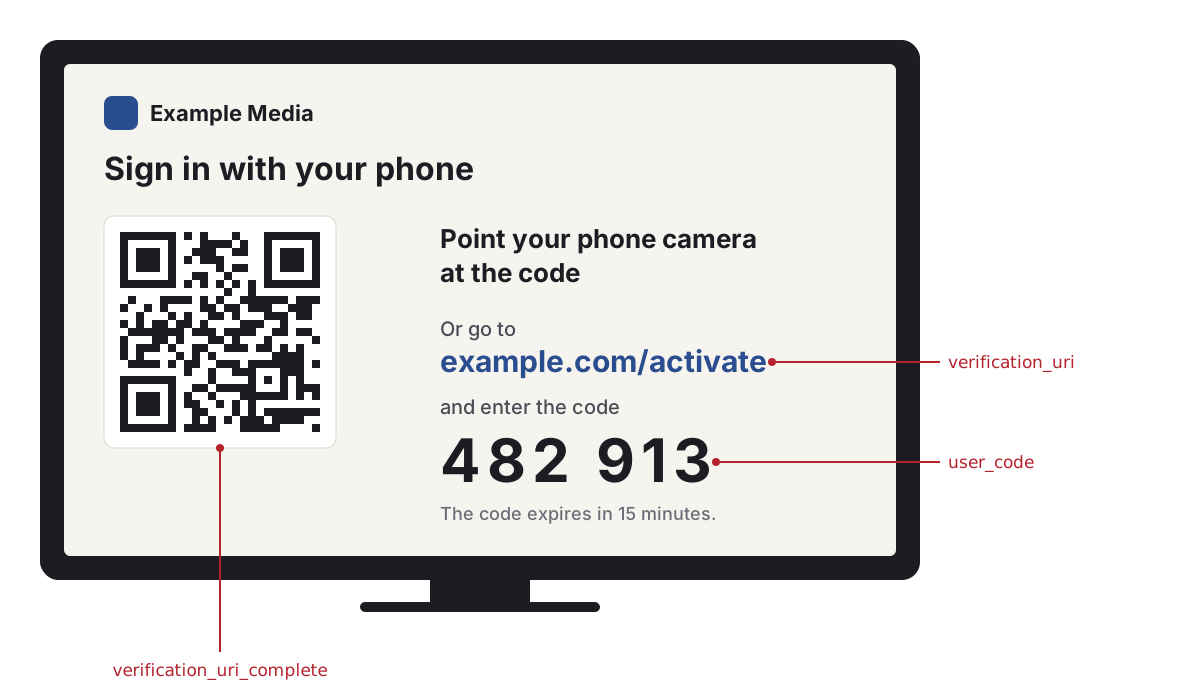
- Render
verification_uri_completeas a QR code. It is a plainhttps://URL; put it in the QR code exactly as you received it. Don't wrap it in a custom URL scheme, a link shortener or a redirect of your own. - Show
verification_urianduser_codeas text next to the QR code, large enough to read from the sofa. Typing the code is a first-class path, not a fallback: not every member will scan. - Write "Point your phone camera at the code". Never "Scan with a QR app". The phone's own camera opens the link directly. Third-party QR scanner apps have intercepted sign-in flows like this one with paywalls and look-alike pages.
- Show the code exactly as
user_codegives it. The phone shows the same code on the approve screen, and the member compares the two before approving. That comparison is what stops a member from approving someone else's TV, so the code must stay on screen even when the member scans. - When the code expires, request a new one and show it, or offer a button to do so.
3. Poll for the Tokens
While the code is on screen, poll the token endpoint with the device_code.
Endpoint
POST /api/oidc/token
Headers
Content-Type: application/x-www-form-urlencoded
Accept: application/json
Parameters
| Parameter | Required | Type | Description |
|---|---|---|---|
| grant_type | Yes | string | urn:ietf:params:oauth:grant-type:device_code |
| device_code | Yes | string | The device_code from step 1. |
| client_id | Yes | string | Your Client ID. |
Example Request
curl --request POST 'https://example.com/api/oidc/token' \
  --header 'Accept: application/json' \
  --data-urlencode 'grant_type=urn:ietf:params:oauth:grant-type:device_code' \
  --data-urlencode 'device_code=Sx8mJ0p2lW7bqC3vK9tYc1fN6uR4hZ5aE2dG8iL0oPq' \
  --data-urlencode 'client_id=your-client-id'
The Polling Contract
Wait interval seconds before the first poll and between polls. Send one poll at a time: wait for
the answer before you start the next wait. Until the member has approved, the token endpoint answers
400 with one of these errors:
error | Meaning | What to do |
|---|---|---|
authorization_pending | The member hasn't approved yet. | Keep polling. |
slow_down | You polled before the interval was up. | Add 5 seconds to your interval, for this poll and all later ones, and keep polling. |
expired_token | The code expired before the member approved. | Stop polling. Request a new code and show it. |
access_denied | The member rejected the sign-in on the phone. | Stop polling. Tell the member the sign-in was declined, and let them start again. |
invalid_grant | The device code is unknown, belongs to another client, or was already used. | Stop polling. Request a new code and show it. |
If an answer isn't JSON, or has status 429 or 5xx, treat it as temporary: double your interval
and keep polling until the code expires.
A device code can be exchanged for tokens once. Polling again with the same device code after
success is refused with invalid_grant, and it also ends the sign-in: the refresh token you just
received stops working, and the TV is signed out when its access token expires.
Response
The first poll after the member approves returns the tokens:
{
  "access_token": "eyJhbGciOiJSUzI1NiIsInR5cCI6ImF0K2p3dCJ9...",
  "expires_in": 14400,
  "id_token": "eyJhbGciOiJSUzI1NiJ9...",
  "refresh_token": "aR7kQ2nV9xL4mB8cT1wJ5yH3pF6sD0gE...",
  "scope": "openid offline_access",
  "token_type": "Bearer"
}
4. Use the Tokens
From here the TV is an ordinary OIDC client.
- The access token is a JWT for the Subrite API, valid for 4 hours. Send it as a Bearer token, as described in Use Access Token to Make Requests to Subrite API. The member and subscription APIs are listed in Member Information, Content, Consent, and Subscription Access APIs.
subis the member's numeric Subrite user id, in both the access token and the ID token. It is the same in web and device tokens, and matchesuserIdin the member profile response. It is not a UUID, and not the member'sid.
Refresh the Access Token
Refresh the same way as in the web flow, described in
Get Refresh Token: POST /api/oidc/token
with grant_type=refresh_token, refresh_token and client_id. A public client sends no
client_secret.
Every refresh response contains a new refresh token, and the one you sent stops working. Store the refresh token from every token response and discard the previous one.
If an old refresh token is used again, Subrite treats it as stolen: it revokes the whole sign-in and
answers invalid_grant. The TV is signed out, and the member has to sign in again.
- Save the new refresh token before you do anything else with the response.
- Never refresh twice in parallel with the same refresh token, for example from two threads or two app processes.
When a refresh answers invalid_grant, the sign-in has ended: it was revoked, it expired, or an old
refresh token was reused. Delete the stored tokens and start the device flow again from step 1.
5. Sign Out
To sign the TV out, revoke its refresh token. This ends the sign-in on Subrite, so the refresh token can't be used again.
Endpoint
POST /api/oidc/token/revocation
Headers
Content-Type: application/x-www-form-urlencoded
Parameters
| Parameter | Required | Type | Description |
|---|---|---|---|
| token | Yes | string | The current refresh token. |
| token_type_hint | No | string | refresh_token |
| client_id | Yes | string | Your Client ID. |
Example Request
curl --request POST 'https://example.com/api/oidc/token/revocation' \
  --data-urlencode 'token=aR7kQ2nV9xL4mB8cT1wJ5yH3pF6sD0gE...' \
  --data-urlencode 'token_type_hint=refresh_token' \
  --data-urlencode 'client_id=your-client-id'
The endpoint answers 200 with an empty body, also when the token was already invalid.
Then delete all stored tokens on the TV. The access token is a JWT and stays valid until it expires (at most 4 hours), so the TV must stop using it itself.
The browser logout endpoint, /api/oidc/session/end, does not apply to a TV: there is no browser
session to end.
Checklist
- The device flow is enabled for your client (ask us), on stage before production.
- Endpoints come from
/.well-known/openid-configuration. - The code request includes
scope=openid offline_access, and noclient_secret. - The TV shows the QR code, the URL and the code, and says "Point your phone camera at the code".
- Polling waits
intervalseconds, adds 5 seconds onslow_down, and stops on success or on any error other thanauthorization_pendingandslow_down. - Every new refresh token is stored, and the previous one is discarded.
- Signing out revokes the refresh token and deletes all tokens on the TV.